
SD1001
Smoke detector with LoRaWAN
- SKU
- 250100
- Power supply
- 230 VAC with replaceable backup battery
- Temperature / humidity
- Not included
230 VAC smoke detection with battery backup, LoRaWAN and temperature/humidity sensing with SD1001-TH.
230 VAC smoke detection with battery backup, LoRaWAN and temperature/humidity sensing with SD1001-TH.
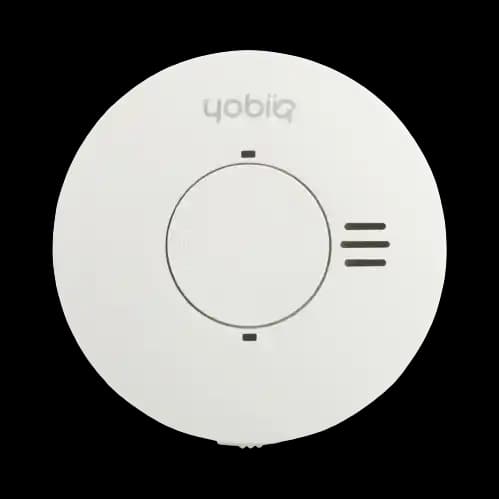 YOBIIQ / SD1001
SD1001 operates from 230 VAC with a replaceable lithium CR123A backup battery for mains interruptions.
Choose from SD1001, SD1001-RF and SD1001-TH. SD1001-TH measures temperature and humidity for environmental monitoring. These measurements do not trigger the smoke alarm; it is not a heat detector.
LoRaWAN reporting supports remote monitoring alongside the local alarm and required maintenance.
Compare the configurations and explore the specifications of each model.
Smoke detector with LoRaWAN
Connected status is useful when someone is responsible for acting on it. Design the follow-up process alongside the detector installation.

Device condition across multiple homes can be hard to track when records are split between visits and separate maintenance lists.
Map each detector to its property and position in the monitoring application. Bring reported alarm, battery and device information into the team’s maintenance workflow.
A clearer record of which device needs attention and who is responsible for following it up.

The team needs to distinguish routine checks from reported device conditions that warrant investigation.
Review available status information and device events before planning work. Use supported remote test functions as part of the maintenance process agreed for the installation.
Better preparation and a traceable follow-up process alongside the required on-site work.

Separate buildings can make it difficult to maintain one up-to-date view of installed detectors and reported events.
Organise detectors by site and building in the platform. Define who receives notifications, how they are acknowledged and how the site’s established response procedures are followed.
An operational overview that connects device information to named responsibilities.
Explore how this device fits into a connected environment.
230 VAC smoke detection with battery backup, LoRaWAN and temperature/humidity sensing with SD1001-TH. Choose the standard, RF or TH model for your installation.
Your device communicates over LoRaWAN. A gateway forwards its messages to a network server, ready for your application to use.
Bring device information into a monitoring platform. Follow readings and events together, with a clearer picture of the environment you manage.
Local detection, remote reporting and maintenance are different parts of the solution. Plan each of them explicitly.
SD1001 uses optical smoke detection with a local audible alarm. Cloud notifications are a separate reporting path.
Install the selected detector according to its approved instructions and the site’s requirements.
Bring supported alarm and device-status messages through LoRaWAN to the application. The team can then review the reported information with the identity and location of the detector.
Associate a received device event with the correct property and maintenance record.
Use the supported test and status functions to help organise checks. Remote information complements the installation’s maintenance process and does not establish that all required inspections can be omitted.
Review a reported condition and assign the next action to the responsible service team.
Connect the device to a LoRaWAN network, then bring its data into the application your team uses. Each layer has a different job.
Connect devices and route their LoRaWAN messages.
Turn decoded data into dashboards, history and actions.
The published SD-1001 guide covers ChirpStack or The Things Network feeding ThingsBoard Professional Edition. Other platform connections need the appropriate decoder and application configuration.
Plan your integrationYobiiq’s SD-1001 guide includes this ThingsBoard dashboard, with detector locations, reported status and alarm information. Follow the documented network and platform setup to build your integration.
Explore the platform example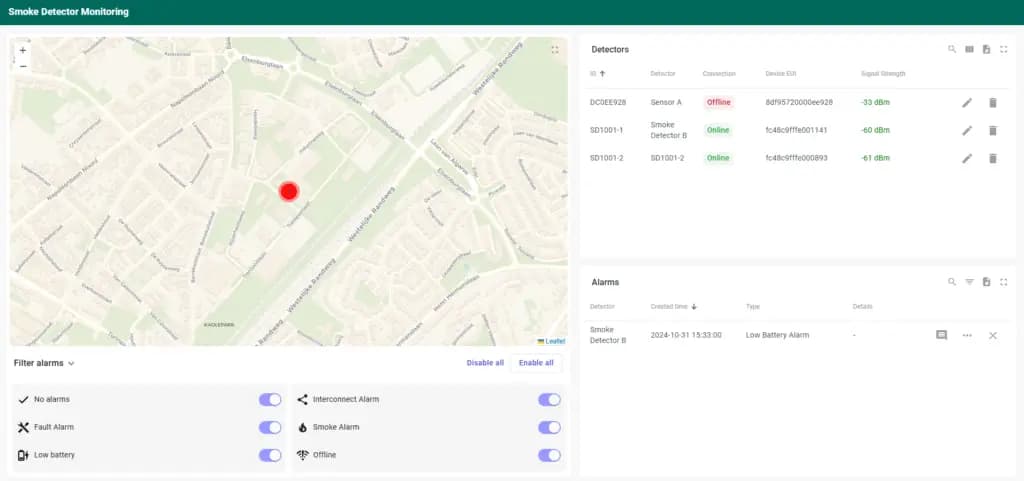
A practical overview to help you specify the right device and the system around it.
Product documentation| Series | SD1001 |
|---|---|
| Power supply | 230 VAC with replaceable backup battery |
| Detection principle | Optical smoke detection |
| Device standard | EN 14604 |
| Standard | SD1001 |
|---|---|
| Wireless RF interlink | SD1001-RF |
| Temperature and humidity sensing | SD1001-TH |
| Connectivity | LoRaWAN |
| TH sensor function | SD1001-TH measures temperature and humidity for environmental monitoring. These measurements do not trigger the smoke alarm; it is not a heat detector. |
Select SD1001, SD1001-RF or SD1001-TH. Include detector count, locations and available LoRaWAN coverage. SD1001-TH measures temperature and humidity for environmental monitoring. These measurements do not trigger the smoke alarm; it is not a heat detector.
Four things to settle before the first device goes into service.
Choose SD1001, SD1001-RF or SD1001-TH and check the installation instructions. SD1001 operates from 230 VAC with a replaceable lithium CR123A backup battery for mains interruptions.
Create an accurate device-to-room record so a received event can be associated with the right place.
Follow the installation instructions for the local alarm function and verify the remote message path separately.
Define notification recipients, maintenance responsibilities and the process for checking communication and device status.
Practical answers about SD1001 series — Mains-powered smoke detectors.
Ask us something elseSD1001-TH measures temperature and humidity for environmental monitoring. These measurements do not trigger the smoke alarm; it is not a heat detector.
SD1001 operates from 230 VAC with a replaceable lithium CR123A backup battery for mains interruptions.
SD1001 is the standard smoke detector with LoRaWAN. SD1001-RF adds wireless interlink with compatible YOBIIQ RF smoke alarms. SD1001-TH adds temperature and humidity measurement.
No. The detector’s local audible alarm and the remote reporting path are separate functions. The connected application receives supported device messages and handles notifications according to its configuration.
It provides additional device information and can support maintenance planning. Do not treat connected monitoring or a remote self-test as a blanket replacement for the inspections, installation checks or maintenance required for the property.
Battery-powered smoke detection, LoRaWAN and temperature/humidity sensing with SD2001-TH.
Tell us what you want to connect, monitor or control. We’ll help you find a starting point.
Talk to the team